
Feature 01

Fitness Tracking

Track every rep, set, and personal record

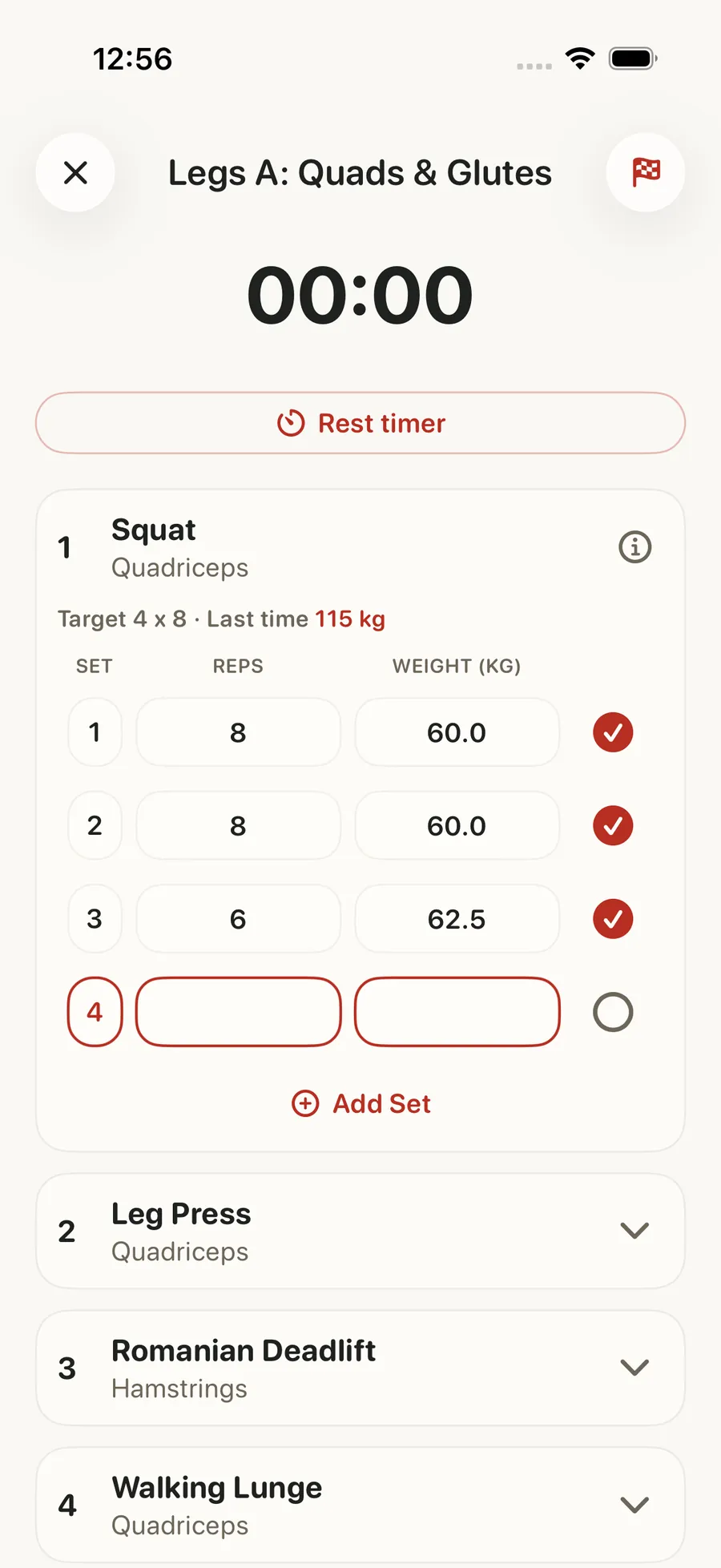
Log every workout with sets, reps, weight, and RPE. Built-in rest timers keep you on pace. Track progressive overload across exercises and watch your strength gains on real charts. Your exercise history, personal records, and volume trends are all in one place, so you always know what to do next.

Fitness Tracking in the Forjex app

Overview

A workout tracker built for the session you are actually doing

A useful gym tracker has to disappear when the set starts. Forjex keeps the live workout focused on the next exercise, the load you used last time, and the fields you need now: sets, reps, weight, RPE, rest, and completion. Warm-up sets, drop sets, supersets, and timed work stay part of the same session instead of forcing you into a generic spreadsheet.

The log becomes more useful after you leave the gym. Exercise history, estimated strength, personal records, training volume, and completed plans all connect to the same record. You can see what changed, where progress stalled, and whether the next session should repeat, add load, or change the target. Weight is shown in your chosen unit while the underlying comparisons remain consistent.

01

Intelligent rest timer recommendations

02

Progressive overload tracking

03

Exercise history and personal records

04

Detailed workout analytics

05

Volume and intensity metrics

Fitness Tracking connected to another Forjex workflow

How it works

From plan to completed workout

Forjex keeps planning, logging, and reviewing in one loop, so the record you create during training is ready to use next time.

  1. 01

    Open today’s session

    Start from a plan, build a workout yourself, or choose exercises from the library. Previous performance is available before the first working set.

  2. 02

    Log without breaking rhythm

    Record sets, reps, load, RPE, rest, and set type as you train. Rest notifications and a Lock Screen Live Activity keep the timer visible away from the app.

  3. 03

    Use the result next time

    Finish with a workout receipt, new records, and updated exercise history. The next session starts with the context created by this one.

Inside the feature

More than a list of sets

The training record stays connected across the live workout, your plan, Apple Health, and the progress views you use between sessions.

01

Live workout

The controls match real strength training

Forjex handles straight sets, warm-ups, drop sets, supersets, RPE, timed rest, and mark-done controls inside the same workout. You can change the session when the gym is busy without losing the structure of the plan.

Live heart rate can appear when Apple Health access is enabled. The active workout remains useful on the Lock Screen through a Live Activity, with rest notifications that do not require the app to stay open.

02

Exercise library

Find the movement and see your own history

The exercise library includes 1,394 movements with instructions and demonstration clips. Filters help narrow the list by muscle, equipment, and movement type instead of making you remember the exact exercise name.

Each exercise connects back to your own sets, records, estimated strength, and recent history. The library is there to help you choose and perform the movement, not to become a separate reference app.

03

Progressive overload

See the trend behind one good day

Personal records matter, but so do the weeks between them. Forjex keeps load, reps, volume, RPE, and estimated strength together so you can tell whether an exercise is moving even when the headline number has not changed.

History is available by workout and by exercise. That makes it easier to separate a single off session from a pattern that calls for a plan change.

04

Training history

One record across plans and imported workouts

Completed Forjex sessions and supported Apple Health workout imports share the same history. Outdoor sessions can include distance and route context when that data is available and you have chosen to share it.

Plans can be built manually, generated with AI, edited, or imported. Whichever path you choose, the live session and resulting history use the same training model.

Questions

Fitness Tracking, explained

The practical details people usually want before adding another fitness app to their routine.

Can I build my own workout plan in Forjex?

Yes. You can build a plan yourself, edit an existing plan, import one, or ask the AI coach to propose a plan around your goals and schedule.

Does the workout tracker support RPE, supersets, and warm-up sets?

Yes. Live workouts support RPE, warm-up sets, drop sets, supersets, rest timers, and set completion alongside standard sets, reps, and load.

Can I use kilograms or pounds?

Yes. Forjex stores a consistent metric value and converts weight at the display and input boundary using your saved unit preference.

Does Forjex import workouts from Apple Health?

Forjex can import supported completed Apple Health workouts. Outdoor workouts can include distance and route data when it is present and you grant access.

Pre-launch

Put fitness tracking in the same place as the rest of your training

Forjex is launching on iOS first. Join the waitlist and we’ll tell you when it is ready to use.

Join the waitlist