Feature 02

Progress Photos

See the change you can't feel day to day

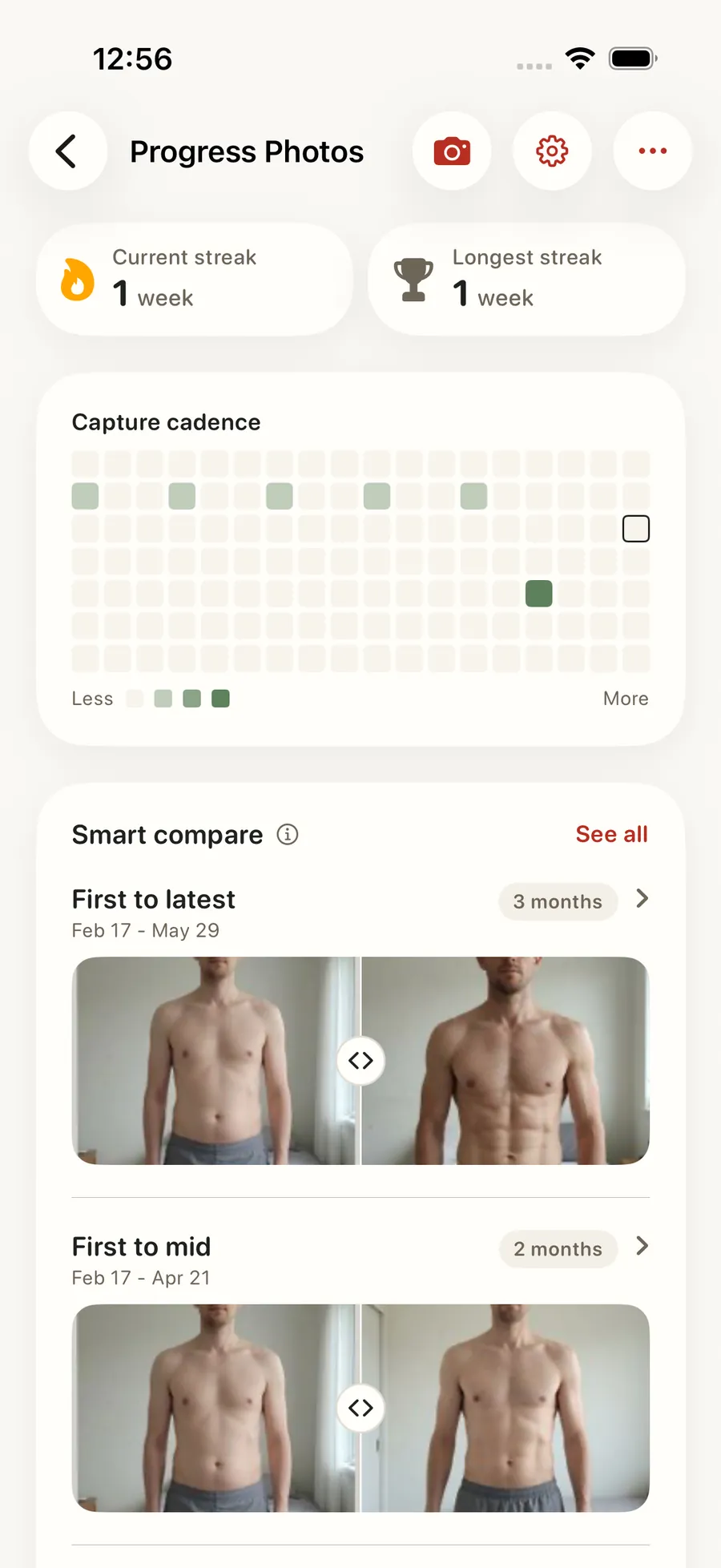
Pose guides line you up the same way every week, so the side-by-side means something. Photos stay private by default, yours alone, until you decide to share one to your feed. Pair them with body weight, measurements, and lift PRs on a single timeline so a flat week on the scale doesn't feel like a flat week overall.

Progress Photos in the Forjex app

Overview

Progress photos that can be compared, not just collected

A camera roll can tell you that you took a photo. It cannot tell you whether the angle changed, connect the image to the rest of your training, or help you compare the right two dates. Forjex gives progress photos their own private timeline with capture guidance, body alignment, side-by-side comparison, and a before-and-after reveal.

The timeline can sit beside body measurements, body weight, and personal records, which matters when one signal moves before another. You choose whether a session is visible to a coach or partner. Biometric protection is available on the device, and delete controls live inside the feature rather than behind a support request.

01

Pose guides for consistent weekly shots

02

Side-by-side comparisons across any date range

03

Private by default, yours unless you share

04

Body weight, measurements, and PRs on the same timeline

05

One-tap share to your feed when you're ready

06

Reminders so you don't forget the next photo

Progress Photos connected to another Forjex workflow

How it works

Build a comparison you can trust

Consistent capture and deliberate access controls turn a folder of sensitive images into a useful progress record.

  1. 01

    Match the capture

    Use pose and framing guidance to keep the angle, distance, and body position closer to the previous session.

  2. 02

    Add it to the timeline

    Save the session privately with its date and related progress context. Milestone prompts and reminders help maintain a useful cadence.

  3. 03

    Compare the right dates

    Choose two sessions for a side-by-side or before-and-after view, then decide whether the result stays private or is shared.

Inside the feature

Private by default, useful over time

The feature is built around repeatable capture, clear comparison, and explicit access rather than public transformation content.

01

Capture

Use the previous session as a guide

On-device pose and image checks help catch problems such as poor alignment, blur, lighting, or an unusable angle before the photo joins the timeline. The goal is a more consistent comparison, not a score for how your body looks.

Coach pose requests can specify the pose, angle, note, and due date. Completing the requested capture ties the new session back to that request.

02

Compare

Move between dates without losing the context

The timeline supports direct comparisons and a before-and-after reveal. Body alignment reduces the visual jump caused by different framing, while the original photos remain available so the comparison stays honest.

Measurements, body weight, and training records can provide the surrounding context. A change that is hard to see in one photo may be clearer across several signals.

03

Privacy

You decide who can see each session

Progress photos start as your private record. Device-level biometric protection can lock the timeline, and visibility for a coach, AI analysis, or a linked partner is controlled separately.

Access can be changed later. The feature also includes a route to delete your progress-photo data instead of treating a sensitive archive as permanent by default.

04

Coaching

Share a useful view with the coach you chose

A coach can review sessions you have made available, draw or leave voice and text annotations, and request a specific follow-up pose. Those notes return to the athlete timeline in the app.

Coach access is scoped to the coaching relationship and your visibility choices. Ending or changing that access does not require publishing the photo to a social feed.

Questions

Progress Photos, explained

The practical details people usually want before adding another fitness app to their routine.

Are progress photos private in Forjex?

Yes. Progress photos are private by default. You control whether a session is visible to a coach, a linked partner, AI analysis, or a social post.

Can I lock progress photos with Face ID or Touch ID?

Yes. The iOS app includes device-level biometric protection for the progress-photo timeline when you enable it.

Can my coach annotate a progress photo?

Yes. A coach can annotate sessions you have shared with them and can send a request for a follow-up pose or angle.

Does Forjex help keep each photo consistent?

Forjex uses capture guidance and on-device image checks to help with pose, alignment, framing, blur, and lighting before a session is saved.

Pre-launch

Put progress photos in the same place as the rest of your training

Forjex is launching on iOS first. Join the waitlist and we’ll tell you when it is ready to use.

Join the waitlist